
A home for your novel.
Qwil is a writing app for novelists on Mac and Windows. Your manuscript, your outline and your notes on characters and places sit in one project, and that project is a folder on your own computer.
Mac and Windows. No account.
Scene
Greywater Ford
Tamsin Roe had forty spears, one river and nobody to ask.
The Ford was the only crossing on the road north for three days in either direction, and the water was already the colour of weak tea.
“Send to Veyra again,” she said. “And tell the Marshal the river won’t wait for his council.”
Everything a novel needs, and only what you switch on.
A word processor gives you a page and leaves the rest of the book to you. Writing software often goes the other way and puts every tool on screen at once.
Qwil has the tools a novel needs: scenes and chapters you can move, an outline, a place for your characters, a clean export at the end. You decide which of them you see. If a book doesn’t need a word count, a spellcheck or the underlined names, switch them off for that book.
Wrote your book in Word?
Bring it with you. Qwil reads your Word file and shows you how it would divide into chapters and scenes before it creates anything. Correct what it misread, then import.
Your Word file stays exactly as it was.
Coming from Word- PartPart One267
- ChapterChapter One: The Summons145
- SceneScene 1The gates of Veyra stood open when Aria reached them, which was the first thing that worried her.145
- ChapterChapter Two: The Road North122
- SceneScene 1Tamsin Roe had forty spears, one river and nobody to ask.68
- SceneScene 2The rider came at dusk, mud to the knees, with a letter sealed in grey.54
- PartPart Two51
- ChapterChapter Three: Terms51
- SceneScene 1Corwin Hale named his price in private, as he named everything.51
Change what a heading becomes.
Write a scene, read a chapter.
A book in Qwil is made of scenes. Open one and it’s the only thing on the page. Open its chapter and the scenes run together as one text, and you can write anywhere in it.
There’s no Save button. Qwil saves a second after you stop typing.
Scene
Greywater Ford
Tamsin Roe had forty spears, one river and nobody to ask.
The Ford was the only crossing on the road north for three days in either direction.
Click the chapter, then a scene.
Tap the chapter, then a scene.
Only the words.
Focus mode hides everything except your text. Typewriter scrolling keeps the line you’re writing at the same height, so your eyes stay in one place while the page moves.
The bench outside the council chamber had been built for people nobody wanted to see.
Aria sat on it for a second day and counted the banners twice.
⌘⇧DFocus mode, on and off
Formatting that stays out of your way.
Italics and bold work the way you know them: select the words and press ⌘I or ⌘B. If you’d rather keep typing, put asterisks around a word and they turn into the formatting.
Quotation marks follow your language. English gets “these”, German gets »these«, and you can pick another style in the settings.
for **eleven** winters
she said, "“Wait"”
Plan as much as you like.
Plan shows the whole book at once: parts, chapters and scenes, each with a line about what happens and a mark for planned, draft or revised. Drag a scene to another chapter and the manuscript follows, because it’s the same book.
A scene with no place yet goes on the shelf until you know where it belongs.
More about the outlineDrag a scene. Click a status to change it.
Tap a scene’s dots, then where it should go.
Qwil knows your characters.
The codex is where you keep your characters and places, and anything else your story needs to remember. When one of their names turns up in a scene, Lens underlines it faintly. Point at the name and a small card tells you who they are.
Was her brother Tomas or Thomas? Which side of the river is the inn on? You can stop scrolling back to chapter two to check.
More about the codexAria VennCharacterEnvoy of the Free Cities, sent north to buy time. Patient in public and less so in private. reached VeyraPlaceCapital of the north, on the east bank. Its gates have stood open for a week, and nobody will say why. on the ninth day. Corwin HaleCharacterLord Marshal of the north. He has commanded the Northern Host for eleven winters and holds a seat on the council. kept her waiting on a bench outside the council, and the letters of the Free Cities LegationGroupThree envoys and their clerks, sent to keep the north out of the war. Their letters are polite and getting shorter. went unanswered.
Envoy of the Free Cities, sent north to buy time. Patient in public and less so in private.
Counts things when she’s nervous and never says so. Banners, steps, guards at a door.
Point at a name. Click it to open the entry.
Tap a name to open its entry.
The folder is the book.
Your book is a folder on your computer. Qwil has no account and no server holding your manuscript. Each scene is a plain text file. Open it in any editor, and back it up the way you back up everything else.
There is no sync built in, because your folder already works with the one you use.
If you stop using Qwil one day, the book is still there and still readable.
Hard to lose anything.
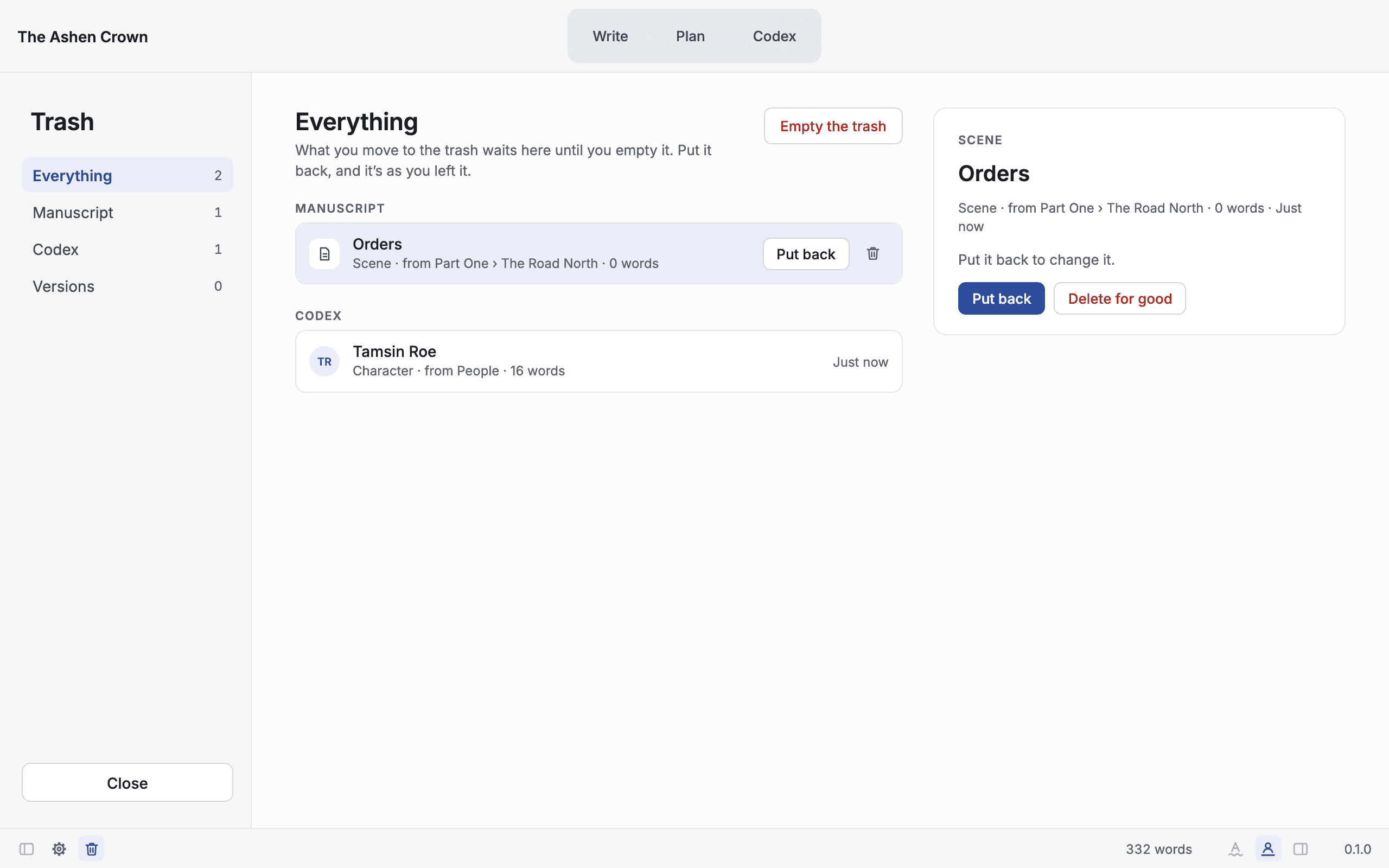
A deleted scene goes to a trash inside your project and stays there until you empty it. Before you rework a scene, save a version of it, and go back if the old one was better.
Undo covers moves and renames as well as typing.
Formatting comes last.
Your draft holds meaning only: italics, headings, scene breaks. Fonts, margins and page size are decided by a profile when you export.
When it’s time to send it out.
Export a Word file or a PDF in standard manuscript format for agents, as a German Normseite, or in a paperback size for your beta readers. Notes you left in the text never go into an export.
Entering a competition that reads blind? Leave the author fields empty and nothing in the file names you.
More about manuscript formatWhat Qwil will cost.
Qwil will cost $69 when it’s out, an introductory price, paid once. A licence will include a year of updates. After that, Qwil keeps working as it is, and you can renew if you want the newer versions.
 Qwil
- Every computer you write on, Mac and Windows
- A year of updates
- The versions it covers keep working
- No account, nothing to sign up for
Try it first for 30 days. Only the days you open Qwil count, so a trial you start in March is still good in June if life got in the way.
Everything about the licenceMade by a writer.
I write novels, and I build software for a living. Over the years I tried the writing apps I could find. Each one was either more than I could keep in my head or less than a novel needs.
For a while I wrote in a code editor. It was the wrong tool for prose, but it showed me what I’d been missing: a tool that knows the project. Qwil is the app I wanted.
The longer storyMit Normseite und »Guillemets«.
Qwil gibt es auf Deutsch. Rechtschreibung und Anführungszeichen folgen der Sprache deines Projekts.
Apply for the beta.
The beta is small, so that we can read every report. Tell us a little about how you write and we’ll be in touch.
If you don’t get a seat, you’ll hear from us the day Qwil is out.
Before you ask.
Does Qwil send my writing anywhere?
No. Your manuscript stays on your computer, and the licence is checked there too.
Can I write on my phone or tablet?
Not yet. Qwil runs on Mac and Windows.
How do I sync between two computers?
Put the project folder in iCloud, Dropbox or whatever you already use. When a file changes, Qwil shows the new text a moment later.
Can I use my licence on more than one computer?
Yes, on every computer you write on, Mac and Windows.
I write in another app, not in Word. Can I move my book?
Most writing apps can export a Word file, and Qwil imports that.
Which languages does Qwil speak?
The app is in English and German. Spelling is checked in English (US), English (UK) and German on a Mac, and in the languages Windows has on Windows.
What happens when my year of updates ends?
Nothing. Qwil keeps working. You only renew if you want later versions.
What happens when the trial ends?
You can still open, read and export every book. Writing waits for a licence.